
gantt-task-react
Interactive Gantt Chart for React with TypeScript.
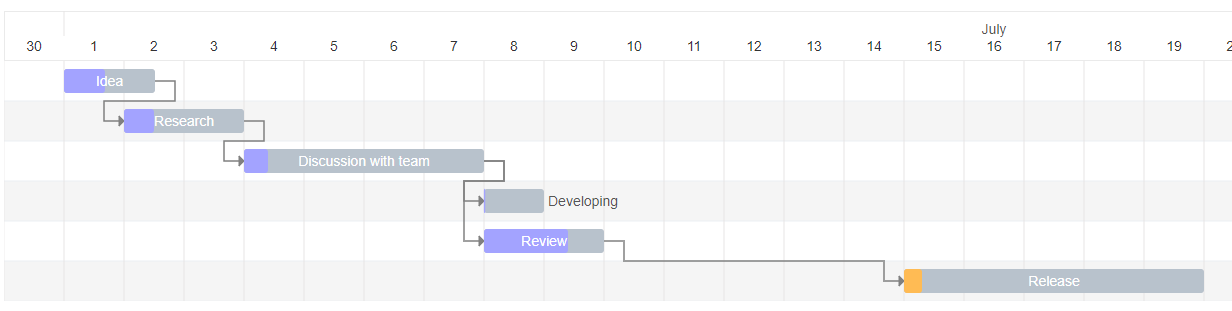
Live Demo
Install
npm install gantt-task-react
How to use it
import { Gantt, Task, EventOption, StylingOption, ViewMode, DisplayOption } from 'gantt-task-react';
let tasks: Task[] = [
    {
      start: new Date(2020, 1, 1),
      end: new Date(2020, 1, 2),
      name: 'Idea',
      id: 'Task 0',
      progress: 45,
      isDisabled: true,
      styles: { progressColor: '#ffbb54', progressSelectedColor: '#ff9e0d' },
    },
    ...
];
<Gantt tasks={tasks} />
You may handle actions
<Gantt
  tasks={tasks}
  viewMode={view}
  onDateChange={onTaskChange}
  onTaskDelete={onTaskDelete}
  onProgressChange={onProgressChange}
  onDoubleClick={onDblClick}
/>
How to run example
cd ./example
npm install
npm start
Gantt Configuration
GanttProps
| Parameter Name | Type | Required | Description |
|---|---|---|---|
| tasks | Task | Yes | Tasks array. |
| EventOption | interface | No | Specifies gantt events. |
| DisplayOption | interface | No | Specifies view type and display timeline language. |
| StylingOption | interface | No | Specifies chart and global tasks styles |
EventOption
| Parameter Name | Type | Required | Description |
|---|---|---|---|
| onDoubleClick | (task: Task) => any | No | Specifies the function to be executed on the bar`s onDoubleClick event. |
| onTaskDelete | (task: Task) => void/Promise | No | Specifies the function to be executed on the bar`s on Delete button press event. |
| onDateChange | (task: Task) => void/Promise | No | Specifies the function to be executed when drag bar`s event on timeline has finished. |
| onProgressChange | (task: Task) => void/Promise | No | Specifies the function to be executed when drag bar`s progress event has finished. |
| timeStep | number | No | A time step value for onDateChange. Specify in milliseconds. |
DisplayOption
| Parameter Name | Type | Required | Description |
|---|---|---|---|
| viewMode | enum | No | Specifies the time scale. Quarter Day, Half Day, Day, Week(ISO-8601, 1st day is Monday), Month. |
| locale | string | No | Specifies the month name language. Able formats: ISO 639-2, Java Locale. |
Work in progress